Navigating the building permit process in Honolulu can be daunting. The Honolulu Department of Planning and Permitting (DPP) has introduced a solution. Their ePlans system allows for online submission of building permits.
This system is designed to simplify the process. It reduces the need for physical paperwork. Users can submit, review, and track permits electronically.
Creating an account on the ePlans portal is the first step. This account gives access to a streamlined application process. It also allows real-time tracking of permit status.
The ePlans system supports various permit types. These include residential, commercial, and industrial projects. Detailed guidelines are available to assist users.
Submitting permits online can save time. It often reduces processing times compared to paper submissions. The system is accessible 24/7 for convenience.
Technical support is available for users. This ensures a smooth experience with the ePlans system. Training sessions and webinars are also offered.
This guide will walk you through the process. It aims to make submitting your Honolulu building permits easier.
Understanding the Honolulu DPP ePlans System
The Honolulu DPP ePlans system is an innovative online platform. It replaces traditional paper-based permit submissions. This system makes handling permit applications more efficient for applicants.
Users must register on the ePlans portal to start. This involves creating a secure account. The account allows access to various online features for permit management.
Once registered, applicants can upload their building plans digitally. The system ensures documents reach the appropriate reviewers. This eliminates the need for physical handling and delays.
The ePlans portal also facilitates communication between applicants and city reviewers. Users receive notifications and updates via email. These features keep everyone informed and engaged throughout the process.
Several key features of the Honolulu DPP ePlans system include:
- Electronic submission of permit applications
- Real-time tracking of application status
- Email notifications for updates
- Support for different permit types
Before using ePlans, users should understand the system’s requirements. Ensuring that the correct software and browser settings are in place is crucial. Additional resources and support are available to guide users effectively.
Benefits of Using ePlans for Honolulu Building Permits
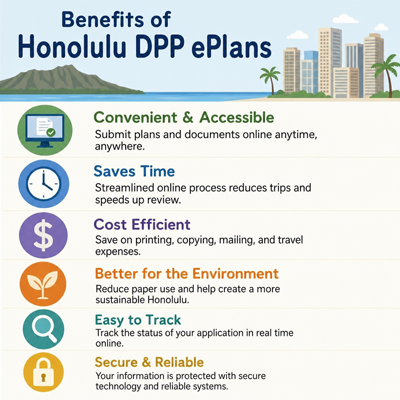
Submitting building permits through the ePlans system offers notable advantages. One main benefit is efficiency. Online submissions reduce the time spent on paperwork, streamlining the entire process.
Another significant advantage is convenience. The ePlans platform is accessible 24/7. This means you can submit applications whenever it fits your schedule, without being tied to office hours.
Applicants also gain transparency through this system. You can track your permit status in real time. This feature greatly enhances visibility and predictability in the permitting process.
An additional benefit is environmental impact reduction. By using digital submissions, the need for paper is minimized. This shift is part of a broader effort to adopt sustainable practices.
Key benefits include:
- Enhanced efficiency and reduced paperwork
- 24/7 access to the platform
- Real-time tracking of permit status
- Contribution to sustainable practices
Overall, ePlans makes applying for building permits in Honolulu easier and more sustainable, enhancing user experience and environmental consciousness.
Who Needs to Use ePlans? Permit Types and Requirements
The Honolulu DPP ePlans system caters to a diverse group of users. Homeowners, contractors, and architects all benefit from this digital platform. Anyone involved in building or renovation projects in Honolulu should consider using ePlans.
Various permit types are available through this online system. Users can apply for residential, commercial, and industrial project permits. This versatility makes ePlans suitable for a wide range of construction needs.
Before starting, it’s crucial to know the requirements for your project type. Each permit has specific documentation and format needs. Ensure your documents comply with these standards to prevent submission issues.
Key permit types include:
- Residential building permits
- Commercial building permits
- Industrial project permits
Understanding the types of permits and requirements is vital. This knowledge will facilitate a smoother application process, minimizing delays or rejections. Using ePlans effectively streamlines handling your building permit needs.
Preparing for Your Online Permit Submission
Getting your documents ready is essential for a successful ePlans submission. Start by gathering all required paperwork and digital documents. This preparation minimizes errors and speeds up your application process.
Begin by checking the Honolulu DPP website for detailed guidelines. These resources will outline the necessary documents and formats. Understanding these requirements saves time and reduces the chance of rejected applications.
Ensure your digital documents meet the necessary technical specifications. File size, type, and naming conventions are important. Non-compliant files could delay your permit application.
Keep in mind that specific software and browser settings are required. This ensures the ePlans system functions smoothly. Install and configure these tools ahead of time for a seamless experience.
Here’s a quick checklist to guide your preparation:
- Gather all necessary documents and plans
- Review format and size specifications
- Configure software and browser settings
By thoroughly preparing your submission, you streamline the process and avoid common pitfalls. Proper preparation makes the entire submission more efficient, ensuring a better experience with Honolulu DPP ePlans.
Step-by-Step Guide: How to Submit Your Building Permit Online
Navigating the ePlans system is straightforward with the right guidance. This step-by-step guide will walk you through the process. Follow each step carefully to ensure a smooth experience.
Start by visiting the Honolulu DPP ePlans portal. Here, you’ll initiate the account creation process. Ensure you have a reliable internet connection throughout.
Creating Your ePlans Account
First, register for an account on the ePlans portal. This is essential for accessing all features. The registration process is user-friendly and should only take a few minutes.
- Visit the ePlans website
- Click on the ‘Register’ button
- Fill out the required information
Be accurate when filling out your details. Accurate information ensures you receive notifications and updates promptly. After submitting, check your email for a verification link.
Uploading and Formatting Your Documents
After registering, the next step is uploading your documents. The ePlans system accepts several file formats, so ensure compatibility. Incorrect formats may cause delays.
Ensure your files adhere to the DPP’s guidelines. This includes file size, naming conventions, and format. Preparing your files ahead of time reduces errors during submission.
Steps to upload and format documents:
- Log in to your ePlans account
- Navigate to the ‘Submit New Application’ section
- Upload your documents following the on-screen instructions
Once documents are uploaded, double-check them for accuracy. Correctly formatted documents improve your chances of speedy approval.
Submitting Your Application and Paying Fees
With documents ready, proceed to the application submission. Ensure all information entered is correct. Check every detail to prevent future complications.
The submission process will guide you through fee payment. Be ready to use a debit or credit card. Payments are secure and efficient within the ePlans portal.
Here’s a quick submission checklist:
- Review all application details
- Follow prompts to pay required fees
- Confirm submission completion via email
Once your payment is processed, you’ll receive confirmation. This confirms that your application is under review. Track the application’s status through your ePlans account for updates.
Tracking, Revising, and Managing Your Application
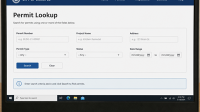
Once your building permit application is submitted, monitoring its progress becomes a priority. The Honolulu DPP ePlans system allows you to track your application in real-time. This feature keeps you informed of every development regarding your submission.
To check the status, simply log into your ePlans account. Navigate to the ‘My Applications’ section, where you can view detailed updates. This transparency helps eliminate guesswork and keeps you prepared for subsequent steps.
If revisions are requested by reviewers, ePlans makes it easy to upload new documents. The system will notify you via email about necessary changes. Promptly addressing these ensures that your application advances without delays.
Effective application management involves:
- Regularly checking for status updates
- Quickly responding to any revision requests
- Maintaining communication with DPP reviewers
Managing your application diligently can significantly enhance your project’s timeline. Whether it’s tracking progress or addressing feedback, the ePlans system provides the tools you need for efficient permit management.
Common Mistakes and How to Avoid Them
Submitting building permits online through the Honolulu DPP ePlans can be complex. Some common pitfalls hinder the process if you’re unprepared. Avoiding these errors will save time and frustration.
One frequent mistake is not adhering to document formatting requirements. Files must meet specific specifications to upload correctly. Proper preparation ensures that your submission is accepted the first time.
Misunderstanding permit types or missing deadlines can delay approval. Familiarize yourself with local regulations and timeframes. Ensuring compliance with all guidelines streamlines the approval process.
To prevent errors, consider these tips:
- Double-check document formats before uploading
- Verify permit requirements in advance
- Keep track of all submission deadlines
By following these steps, you can submit confidently, knowing you’ve minimized the risk of setbacks.
Support, Resources, and Training for ePlans Users
Navigating the Honolulu DPP ePlans system can be daunting for first-time users. Fortunately, a variety of resources are available to assist you. These materials help ensure a smooth submission process.
The Department of Planning and Permitting provides detailed guidelines on its website. These documents cover every aspect of the online submission process. Users can also access training sessions and webinars tailored to ePlans navigation.
If you encounter issues, technical support is readily accessible. They offer assistance with software glitches or account-related inquiries. Utilize these resources to maximize the efficiency of your online permit submissions.
For easy reference, consider these key resources:
- Online guides and tutorials
- Interactive webinars and training sessions
- Dedicated technical support team
By taking advantage of these resources, you can master the ePlans system and streamline your building permit process.
Frequently Asked Questions About Honolulu DPP ePlans
New users often have several questions about the ePlans system. Understanding these common concerns can help streamline your experience. Here are some frequently asked questions to consider.
Many users wonder about system compatibility. The ePlans system requires specific software and browser settings. Ensure your setup matches the system’s requirements.
Another common inquiry involves document formatting. Verify that your uploaded documents meet the necessary criteria before submission. This prevents delays in the review process.
Consider these frequently asked questions:
- What software is needed for ePlans?
- How should I format my documents?
- How can I check my application’s status?
Equipped with this information, you can confidently navigate the ePlans system and address common challenges effectively.
Conclusion: Streamlining Your Honolulu Building Permit Process
Incorporating the Honolulu DPP ePlans into your permit submissions simplifies the procedure significantly. By leveraging this modern system, you can save time and reduce the hassle of traditional paper applications. Whether you’re a homeowner or a professional, utilizing ePlans means faster processing and convenient updates.
As you use the ePlans system, stay informed about guidelines and updates to maximize its benefits. The streamlined approach not only improves efficiency but also enhances your overall project experience. Embrace technology to make Honolulu building permits straightforward and effective.